
Why Zoho Implementation Fails (and Succeeds) for MSMEs
Many manufacturing MSMEs in Chennai and across Tamil Nadu already use Zoho in some form.
Some have Zoho Books for accounting.
Some have Zoho CRM but only for basic lead tracking.
Some tried Zoho Inventory but stopped halfway.
And many quietly say this:
“We have Zoho… but we’re not really using it properly.”
This is not because Zoho is weak.
It’s because implementation matters more than the software itself.
For manufacturing businesses — especially electrical, electronics, trading + production, or job-work based units — Zoho works well only when it is implemented with the ground reality in mind.
This guide explains:
- What Zoho implementation really means for MSME manufacturers
- Where most implementations go wrong
- What a practical Zoho setup looks like
- How Chennai-based MSMEs should approach it step by step
No jargon. No heavy ERP talk. Just clarity.
What “Zoho Implementation” Actually Means for Manufacturing MSMEs
Many people think Zoho implementation means:
“Install Zoho Books or Zoho CRM and start using it.”
In reality, for manufacturing MSMEs, implementation means connecting how your factory actually works with the right Zoho apps.
A proper Zoho implementation typically includes:
- Sales enquiries and orders (Zoho CRM)
- Inventory movement (Zoho Inventory)
- Accounting and GST (Zoho Books)
- Production or job work tracking (Zoho Creator)
- Dashboards for owners and managers (Zoho Analytics)
The goal is not to use all Zoho apps.
The goal is to use the right combination, configured correctly.
The Common Problems MSMEs Face with Zoho Implementation
Across Chennai and Tamil Nadu, we see similar issues again and again:
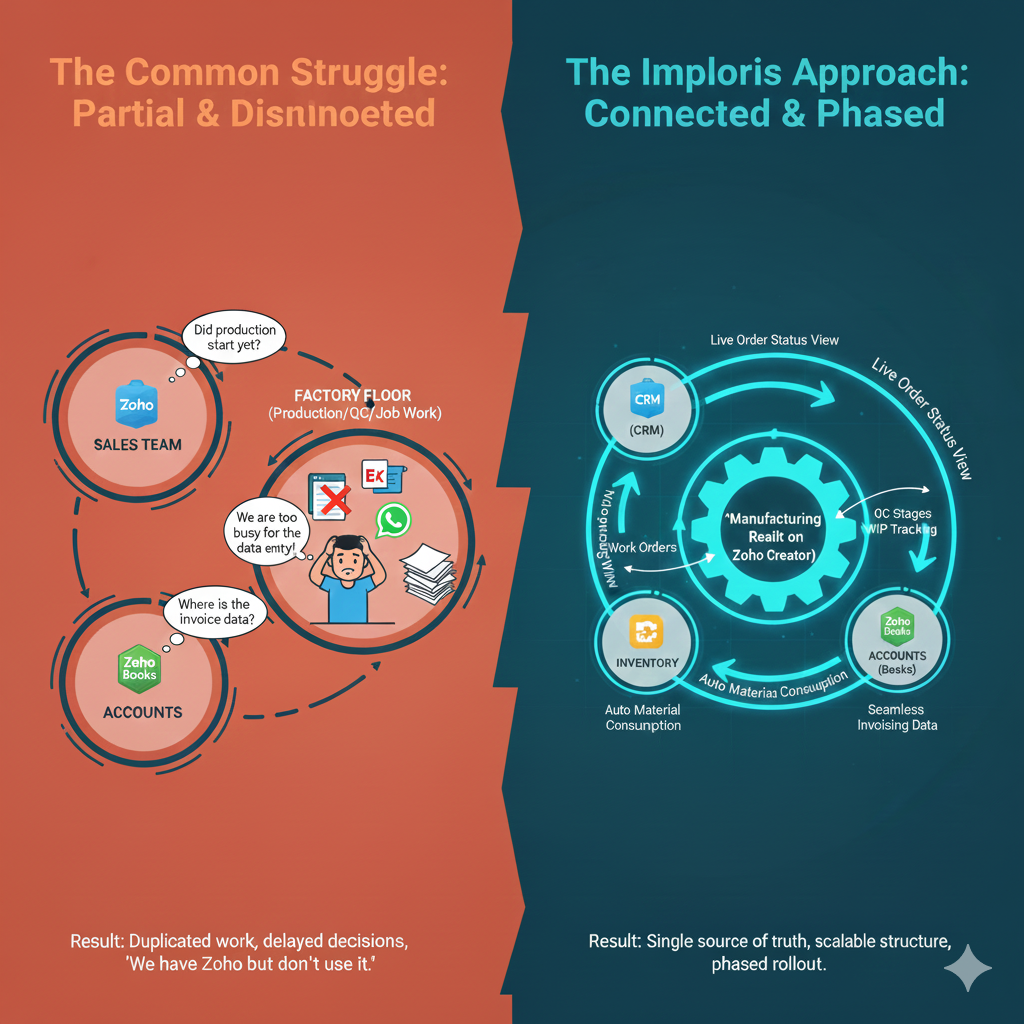
1. Partial implementation
Zoho is set up for one department, but others still work manually.
Sales uses CRM.
Accounts uses Books.
Production uses Excel or WhatsApp.
Nothing talks to each other.
2. Over-customisation too early
Some businesses try to build everything at once.
Too many fields.
Too many approvals.
Too many rules.
The team gets confused and slowly stops using the system.
3. No manufacturing context
Standard Zoho apps are powerful — but manufacturing has unique needs:
- Work Orders
- Job work tracking
- Stage-wise WIP
- QC checks
- Rework
- Material issue vs consumption
Without addressing these, Zoho feels “incomplete”.
4. No clear ownership
Nobody owns the system.
When something breaks or needs change:
“Let’s manage in Excel for now.”
And Zoho becomes just another unused tool.
What a Practical Zoho Implementation Looks Like for Manufacturers
A good Zoho implementation for MSME manufacturers is simple, phased, and grounded.
Here’s what usually works best.
Step 1: Start with the Core (Don’t Overthink)
Most manufacturing MSMEs should start with:
- Zoho CRM – enquiries, customers, orders
- Zoho Books – accounting, GST, invoicing
- Zoho Inventory – stock, purchases, sales orders
This already brings 60–70% structure.
The key is clean configuration, not complexity.
Step 2: Identify Manufacturing Gaps (This Is Critical)
Now comes the important question:
“What parts of our workflow are not covered yet?”
Typical gaps include:
- Work order tracking
- Job work / subcontracting
- WIP visibility
- QC stages
- Production status updates
- Internal approvals
- Cost tracking beyond basic inventory
This is where many MSMEs assume they need a full ERP.
They don’t.
Step 3: Use Zoho Creator for Manufacturing Workflows
Zoho Creator allows you to build custom production and workflow apps that sit neatly inside the Zoho ecosystem.
For manufacturing MSMEs, Creator is often used for:
- Work order modules
- Stage-wise production tracking
- Job work and vendor coordination
- QC and rejection tracking
- Material requisition and issue
- Simple production dashboards
Creator connects seamlessly with:
- Zoho Inventory
- Zoho Books
- Zoho CRM
So data flows instead of getting duplicated.
Step 4: Connect Everything (Small Integrations, Big Impact)
A good Zoho implementation ensures:
- Orders flow from CRM → Inventory
- Inventory updates reflect in Books
- Production status updates visibility for sales and management
- Accounts don’t chase information at month end
This is where MSMEs suddenly feel:
“Now we know what’s actually happening.”
Step 5: Roll Out in Phases (Not All at Once)
This is especially important for Chennai-based MSMEs where teams are hands-on and practical.
A phased rollout works best:
- Phase 1: Sales + Accounts
- Phase 2: Inventory
- Phase 3: Production workflows
- Phase 4: Dashboards and automation
Teams adapt faster. Resistance reduces.
Why Zoho Works Well for Tamil Nadu MSME Manufacturers
Zoho has a few advantages that matter locally:
- Familiar interface for teams
- Affordable compared to heavy ERPs
- Strong GST and Indian compliance
- Flexibility through Creator
- Large local partner ecosystem
- Growing adoption across Chennai, Coimbatore, Hosur, etc.
Most importantly, Zoho allows MSMEs to grow into structure, instead of forcing structure overnight.
When Zoho Is (and Isn’t) the Right Choice
Zoho is a good fit if:
- You are an MSME (10–200 employees)
- You want clarity, not over-engineering
- Your workflows can be simplified
- You want modular growth
- You prefer lower risk and phased investment
Zoho may not be ideal if:
- You need very complex MRP or BOM logic
- You require deep manufacturing planning like large ERPs
- Your operations are extremely rigid and process-heavy
For most MSME manufacturers, Zoho + Creator is the right balance.
How Imploris Approaches Zoho Implementation for MSMEs
At Imploris, we don’t start with software.
We start with:
- How your factory actually works
- Where information breaks
- What slows decisions
- Which updates don’t reach accounts or sales
- Where manual work causes delays
Then we:
- Configure standard Zoho apps properly
- Extend only where required using Zoho Creator
- Integrate cleanly
- Roll out in phases
- Train teams practically
The focus is always clarity, adoption, and sustainability — not complexity.
A Simple Next Step
If you’re:
- Planning a Zoho implementation
- Struggling with a partial or broken setup
- Unsure whether Zoho fits your manufacturing workflow
A quick Zoho consultation call can help you decide the right direction.