
A manufacturing business rarely becomes difficult to manage because one process suddenly stops working. More often, the business grows around a collection of processes that worked reasonably well when volumes were smaller, the team was closer to each other, and everyone knew who to call when something needed attention.
Orders increase. More people become involved. Production passes through more stages. Materials move between locations or external vendors. Customers ask for faster updates. Finance needs information from operations, while operations needs information from procurement and sales.
The business still functions, but the way information moves through it starts becoming harder to manage.
An Excel file is updated by one person. A production update is sent through WhatsApp. A supervisor keeps a note in a book. Procurement has a separate vendor list. Accounting has its own system. Someone maintains a physical board for dispatch.
None of these tools is necessarily the problem.
The problem is that the business has outgrown the way its information and processes are connected.
This is where manufacturing systems architecture becomes important.
A manufacturing system should not begin with the question, “Which ERP should we buy?” It should begin with a more fundamental question:
How should information move through our business so that the right people can make the right decisions at the right time?
That question changes the entire approach to selecting and implementing business software.
What Is Manufacturing Systems Architecture?
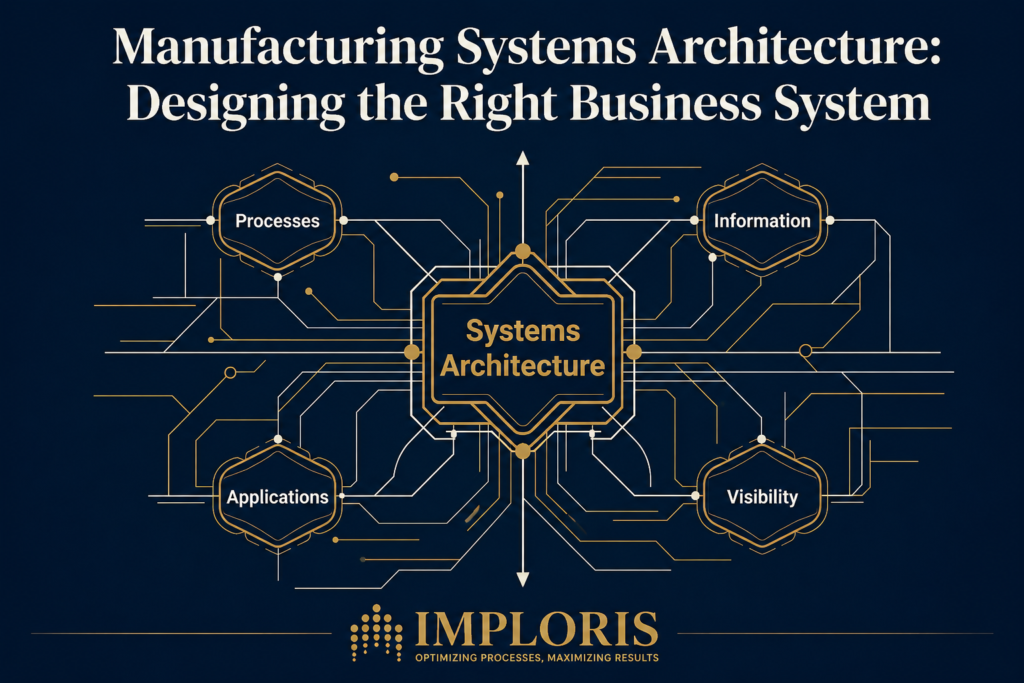
Manufacturing systems architecture is the way a business structures its processes, information, applications, people and handoffs so that the operation can function as one connected system.
It is not simply an ERP diagram.
It is not a list of software modules.
And it is certainly not a decision about whether to use one particular software platform.
A practical manufacturing systems architecture considers how an enquiry becomes an order, how an order creates production or procurement requirements, how materials move through the business, how work is tracked, how quality is recorded, how external processing is controlled, and how the completed transaction eventually reaches dispatch, invoicing and payment.
A simplified flow might look like this:
Customer Enquiry → Quotation → Order → Planning → Material → Production → WIP → QC → Dispatch → Invoice → Payment
The important question is not whether these steps exist. They almost always do.
The important question is whether information moves reliably between them.
If sales knows an order is confirmed but production does not know what needs to be started, there is a systems problem.
If production knows what is being made but procurement cannot see the material requirement, there is a systems problem.
If material has been sent to an external processor but nobody can confidently say what quantity is outside the factory, there is a systems problem.
If management has to call three people and check two spreadsheets to find out why an order is delayed, there is a systems problem.
This is why architecture needs to come before software.
Start With the Business, Not the Software
One of the easiest mistakes to make is to start by looking at software.
A business begins comparing ERP products, watching product demonstrations and creating feature lists:
- Does it have inventory?
- Does it have production?
- Does it support BOMs?
- Does it have dashboards?
- Can it integrate with accounting?
- Does it have mobile access?
These questions are useful, but they come too early.
Before evaluating software, a business needs to understand its own operating model.
For example, a manufacturer may have a standard production process where material is issued, processed, inspected and completed.
Another manufacturer may work on highly customised orders where every project involves engineering approval, drawing revisions, procurement, multiple production stages and customer-specific requirements.
A third may purchase finished products from several vendors and coordinate procurement, inventory, dispatch and customer service without actually manufacturing everything internally.
All three are manufacturing businesses, but their systems requirements are very different.
The architecture needs to reflect the business.
The Five Layers of a Practical Manufacturing System
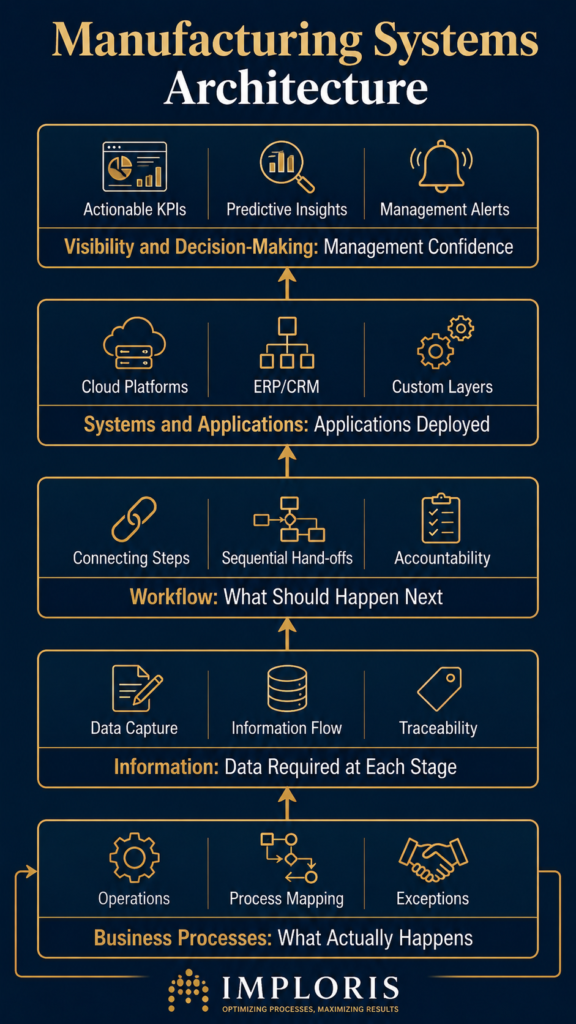
A useful way to think about manufacturing systems architecture is through five connected layers.
1. Business Processes
Start with what actually happens.
Map the major processes:
Lead → Order → Procurement → Production → Quality → Dispatch → Finance
Then go deeper.
What happens when material is unavailable?
What happens when a customer changes a specification?
What happens when production rejects a batch?
What happens when material is sent to a job worker?
What happens when a finished product is ready but payment is still pending?
These exceptions are often more important than the standard process.
2. Information
Once the processes are understood, identify the information required at each stage.
An order may need:
- Customer
- Product
- Quantity
- Specification
- Required date
- Order reference
- Pricing
- Delivery requirements
Production may need:
- BOM
- Material requirement
- Job card
- Routing
- Work centre
- Operator or team
- Planned quantity
- Actual quantity
- Rework
- Scrap
Management may need something completely different:
- What is pending?
- What is delayed?
- Where is the bottleneck?
- What material is short?
- What is currently with an external vendor?
- Which orders are ready for dispatch?
- What requires attention today?
A good system connects these information requirements instead of asking every department to maintain its own version.
3. Workflow
Information by itself does not create control.
The system also needs to understand what should happen next.
For example:
Order Approved → Engineering Review → Drawing Approval → Production Release
or:
Material Issued → Production Stage 1 → QC → Stage 2 → Final QC → Dispatch
Or, where outsourcing is involved:
Material Issued → Vendor Job Work → Gate Out → Processing → Gate In → Quantity Reconciled → Next Stage
The workflow establishes responsibility and creates a record of movement.
This is particularly important when a business depends heavily on individuals to remember what needs to happen next.
4. Systems and Applications
Only after the processes, information and workflows are understood should we decide which applications are needed.
This may include:
- CRM
- ERP
- Inventory
- Accounting
- Manufacturing applications
- Workflow applications
- Analytics
- Document management
- Customer portals
Sometimes one platform can handle much of this.
Sometimes several systems are more appropriate.
In other cases, a business may already have an accounting system that works well and only needs a structured operational layer around it.
That is why there is no universal answer to the question of which ERP is best.
5. Visibility and Decision-Making
The final layer is what management can actually see.
A dashboard is useful only when the information underneath it is reliable.
Management may want to know:
What is moving today?
What is blocked?
Where is it blocked?
Why is it blocked?
Who needs to act?
What is the financial or customer impact?
This is where operational systems become management systems.
A dashboard should not simply tell an owner that 72 orders exist.
It should help explain which orders need attention and why.
The Hidden Problem With Disconnected Systems
Many growing businesses don’t have one system.
They have several.
That can be perfectly acceptable.
The problem begins when the systems become islands.
For example, a business may use Excel for customer and order tracking, Tally or another accounting system for finance, WhatsApp for procurement and vendor coordination, and a physical board for dispatch planning.
Each tool performs a function.
But the business still has no single operational picture.
Someone in sales may know an order has been confirmed.
Someone in procurement may know that material has been ordered.
The warehouse may know that some material has arrived.
Production may know that the order has not yet started.
Finance may know that the customer has an outstanding balance.
Management may know none of this without asking several people.
This is not primarily a software problem.
It is an information architecture problem.
Manufacturing Needs More Than an ERP Module Called “Production”
This distinction is often missed when evaluating ERP systems.
A product demonstration may show a production module with:
- BOM
- Work Orders
- Routing
- Inventory
- Production Reports
Everything looks complete.
But the real question is whether those functions reflect the way the business actually works.
Consider a manufacturer where part of the production process happens externally.
Raw material leaves the factory for powder coating, galvanising, heat treatment, embroidery, weaving, finishing or another specialised process.
At that point, the material is no longer physically inside the factory.
The system therefore needs to know:
What was sent?
To whom?
When?
Against which order or job?
What quantity was issued?
What quantity was expected back?
What was actually received?
Was there wastage or rejection?
What is still outstanding?
A generic production module does not automatically solve this.
The architecture has to account for the physical reality of the business.
The Same Applies to Material and WIP
Material visibility is another area where the architecture matters.
Suppose 100 units of material are issued for a production run.
The planned consumption is 100.
Actual consumption becomes 108.
The additional eight units are not simply a reporting number.
They may represent a production issue, a changed specification, an incorrect assumption in the BOM, wastage, rework, measurement differences or another operational reason.
At the same time, some of the original material may remain unused and need to be returned to stock.
If the system records only the final production quantity, management loses part of the story.
The architecture should therefore capture the movement:
Planned Material → Issued Material → Actual Consumption → Wastage / Rework → Return → Finished Output
That creates the foundation for understanding material variance and, eventually, its effect on production cost and margins.
Do You Need One ERP?
Not necessarily.
There are several legitimate approaches.
Traditional ERP
A business may choose an established ERP that covers accounting, inventory, purchasing, sales and manufacturing in one environment.
This can work well when the business processes closely match the capabilities of the platform and the organisation is prepared for the implementation.
Cloud ERP
A cloud ERP can provide broader accessibility and reduce the need for infrastructure management, while providing a structured application environment for multiple departments.
Modular or Semi-ERP Approach
A business may retain an existing accounting system while adding a separate operational layer for production, workflow, inventory or management visibility.
This can be particularly useful where the existing financial system is working well but operational processes have become difficult to manage.
Custom or Low-Code Components
Where the business has genuinely specific workflows, a custom application or low-code layer can address requirements that do not fit neatly into a standard ERP.
The objective should not be customisation for its own sake.
The objective is to make the system reflect the important realities of the business without creating unnecessary complexity.
The Right Architecture Is Usually a Balance
There is a temptation to look for an all-in-one answer.
One system.
One database.
One vendor.
One dashboard.
Sometimes that is the right approach.
Sometimes it creates more problems than it solves.
A business should instead ask:
Which processes need to be standardised?
Which information needs to be shared?
Which system should own each piece of information?
Where are integrations genuinely required?
Where is customisation justified?
What should remain simple?
This is particularly important for growing businesses that cannot afford a long implementation project that disrupts daily operations.
Don’t Automate a Process You Haven’t Understood
Technology can make a poor process run faster.
It can also make a badly designed workflow harder to change.
Before automation, map the current process.
Identify:
- Where information originates
- Who enters it
- Who uses it
- Where it is duplicated
- Where decisions are made
- Where delays occur
- Where responsibility becomes unclear
- Where information leaves the system
- Where manual reconciliation takes place
Then design the future process.
Only after that should automation be introduced.
This is one reason a manufacturing operations review can be more useful than starting with a software demonstration. The first objective is to understand the operation and identify the gaps that the system needs to address.
What a Good Manufacturing System Should Give Management
The outcome of a well-designed system is not simply better data entry.
It should give management greater confidence in the answers to everyday questions.
For example:
What is moving?
Orders, production, procurement, material and dispatch should have visible status.
What is blocked?
The system should make exceptions visible instead of requiring someone to discover them manually.
Why is it blocked?
A status without a reason is not particularly useful.
Who needs to act?
Responsibility should be visible rather than buried inside conversations.
What is the impact?
A delay may affect production capacity, customer commitments, inventory, cash flow or margin.
This is where the value of architecture becomes visible.
The system begins to support decisions rather than simply record transactions.
A Practical Framework Before Choosing Your ERP
Before committing to an ERP or replacing an existing system, work through these questions:
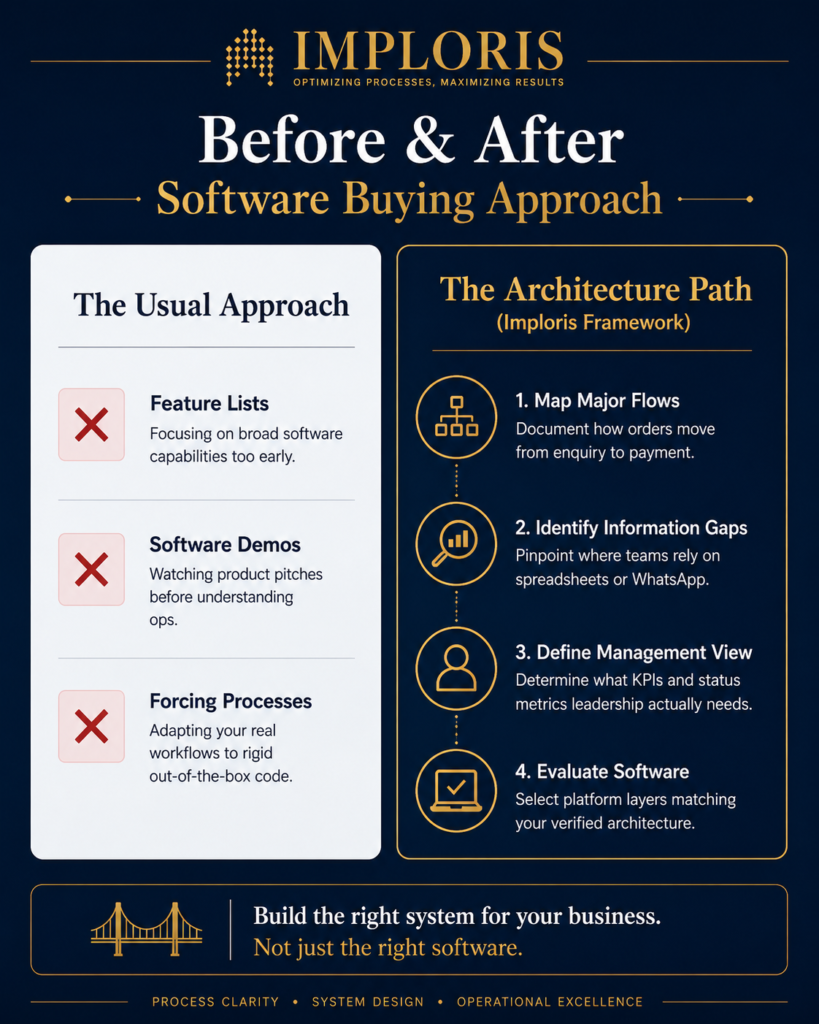
1. Map the major business flows
Document how an order moves from enquiry to payment.
2. Identify the critical handoffs
Look closely at sales to production, production to procurement, production to quality, warehouse to dispatch and operations to finance.
3. Identify the information gaps
Where does someone need to call, message or open another spreadsheet to find an answer?
4. Identify the physical movement
Material and products often move between departments, work centres, warehouses and external vendors. The system should reflect that movement.
5. Decide what needs to be standardised
Not every activity requires automation or customisation.
6. Define the management view
Determine which questions the owner, operations manager, production manager and finance team need answered quickly.
7. Evaluate software against the architecture
Only now should you compare ERP, cloud, modular or custom approaches.
This reverses the usual buying process.
Instead of asking:
“Which software has the most features?”
you ask:
“Which system architecture best supports the way our business needs to operate?”
That is a much better question.
The System Should Fit the Business, Not the Other Way Around
There is no single manufacturing system that is right for every company.
A business with a straightforward production process may benefit from a conventional ERP.
Another may need a combination of accounting, inventory and a specialised operational application.
A growing engineering business may need a more flexible architecture because every order passes through engineering, approvals, procurement and multiple production stages.
The important thing is not to force every business into the same model.
The important thing is to create enough structure that the business can grow without relying on spreadsheets, memory, phone calls and informal messages to hold everything together.
That is the real purpose of manufacturing systems architecture.
Software is one part of the answer. The architecture comes first.
If you are considering a new ERP, replacing spreadsheets, connecting existing accounting software, or simply trying to understand why operational visibility is becoming harder as the business grows, start by reviewing the operation itself.
A structured Manufacturing Operations Review can help identify where information is getting lost, where processes depend on individuals, and what kind of system architecture would actually fit the business before a technology decision is made.
Stop Buying Software Blindly. Map Your Architecture First.
If your growing business relies on disconnected spreadsheets, WhatsApp threads, and manual reconciliations to track orders and materials, a standard software demo won’t solve the root problem.
Request a Manufacturing Operations Review →An objective, architecture-first review of your workflows, data gaps, and system requirements before you commit to an implementation.
FAQ
What is manufacturing systems architecture?
Manufacturing systems architecture is the structure connecting a manufacturer’s processes, information, workflows, applications and people. It defines how information moves from sales and planning through materials, production, quality, dispatch and finance.
Does every manufacturer need an ERP?
No. The right approach depends on the complexity of the business, existing systems, production processes, information requirements and growth plans. Some businesses benefit from an ERP, while others may be better served by a modular or integrated system.
What is a semi-ERP for manufacturing?
A semi-ERP approach combines existing systems, such as accounting software, with a structured operational layer covering areas such as production, inventory, workflows, job work or management visibility. It can be useful when replacing the entire existing system is unnecessary or impractical.
Should a manufacturer replace Excel before implementing an ERP?
Not necessarily. Excel may still have useful roles. The more important question is whether critical operational information depends on manually maintained spreadsheets that cannot provide reliable visibility, accountability or workflow control.
What should be considered before choosing a manufacturing ERP?
A manufacturer should first understand its processes, information flows, material movements, production stages, job work requirements, reporting needs and management questions. Software should then be evaluated against those requirements rather than the other way around.