
Choosing an ERP for a manufacturing business is rarely as simple as comparing features and selecting the software with the longest list.
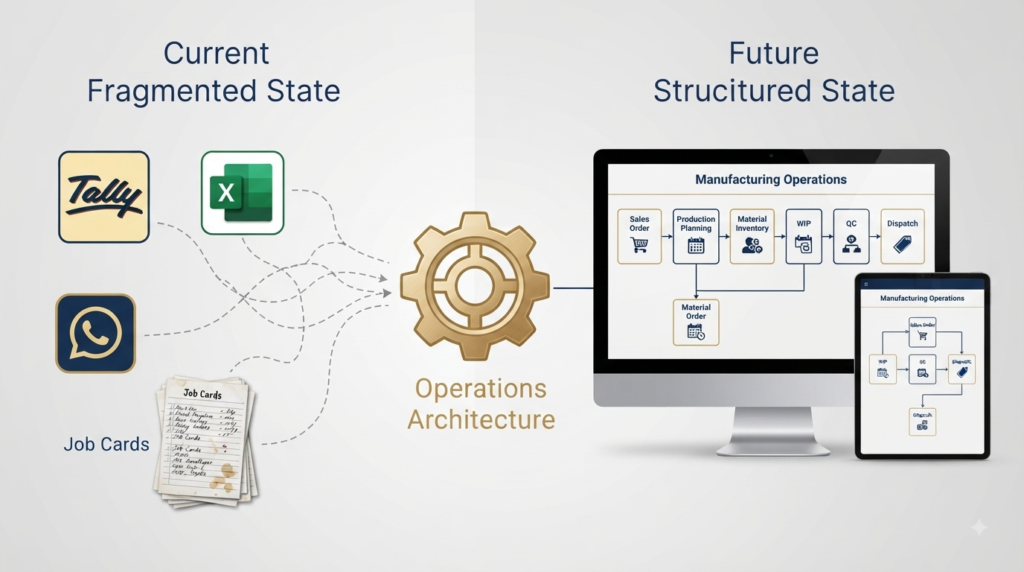
A manufacturing business may already have accounting software, Excel files, production registers, WhatsApp groups, paper job cards and people who know exactly how things work. The business may have operated successfully with these tools for years. The question usually comes when the business grows and the same methods begin taking more time to manage.
Orders increase. More people become involved. Production moves through several stages. Materials are issued, consumed, returned or sent outside for processing. Customers want faster updates. Management wants to know what is pending and why. Finance wants information that can be reconciled with the books.
At that point, the question is often framed as:
Which ERP is best for my manufacturing business?
A better question is:
What does my business actually need the system to control and make visible?
That distinction matters because two manufacturing businesses with similar turnover can have very different operational requirements. One may be comfortable with accounting software and basic inventory management. Another may need production planning, work in progress tracking, job work control, quality checkpoints and dispatch visibility. A third may have highly customised processes that make a rigid standard ERP difficult to adopt.
The right system is therefore not necessarily the one with the most features. It is the one that fits the way the business actually operates.
When Does a Manufacturing Business Really Need an ERP?
There is no fixed number of employees, orders or years in business at which a manufacturer suddenly needs an ERP.
The trigger is usually operational complexity.
A business may still be relatively small but have many different activities taking place between receiving an order and collecting the payment.
For example, a customer order may require material procurement, production planning, multiple processing stages, quality checks, outside job work, material returns and final dispatch. If each of these activities is tracked differently, management gradually loses visibility even though every individual department may appear to be functioning.
This is often when the owner starts asking questions such as:
“Where is this order?”
“Why is it delayed?”
“Who is following up?”
“Has the material arrived?”
“How much material has actually been consumed?”
“Is the job still with the vendor?”
“Can we dispatch it today?”
“Why is the expected margin different from the actual result?”
These are not necessarily ERP questions.
They are operational questions.
The ERP should eventually help answer them, but the first step is understanding how the business needs those answers to be generated.
Accounting Software Is Not the Same as an Operational System
Many manufacturing businesses quite reasonably start with accounting software such as Tally. It handles accounting, invoicing, financial records and statutory requirements, and it may continue to do those things very well as the business grows.
The difficulty comes when the business starts expecting the accounting system to provide detailed operational visibility that was never the primary purpose of the system.
Consider a simple example.
A customer order is confirmed. The production team needs material. Some material is available, some has to be purchased and another part may need to go to an outside processor. Production then moves through several stages before quality approval and dispatch.
Finance may eventually see the invoice and payment.
But management needs to know what happened between the order and the invoice.
That is where the gap often appears.
The business may have the information, but it is distributed across Excel, WhatsApp, paper records, purchase documents and individual follow ups.
This is one reason a manufacturing business should evaluate its operational requirements separately from its accounting requirements.
Excel Can Work for Longer Than You Think
It would be wrong to suggest that Excel is unsuitable for manufacturing.
Excel is useful.
It is flexible, inexpensive and familiar. A small team can create a production tracker, order register, material sheet or planning worksheet without waiting for a software implementation.
The problem begins when Excel becomes the operating system of the business.
Different people create different versions. Information is copied from one workbook to another. Historical records become difficult to retrieve. One person knows which file contains the latest status. Another person has updated a different version.
The business then starts depending on people to explain what the spreadsheets actually mean.
This is not necessarily a problem with Excel itself. It is a sign that the business has outgrown using a spreadsheet as the primary control point for its operations.
We have looked at this problem in more detail in our article on why Excel based manufacturing systems stop scaling.
What Should a Manufacturing ERP Actually Handle?
The answer depends on the manufacturing model, but there are several areas that deserve attention when evaluating a system.
The first is the order itself.
Can the system follow an order from enquiry and quotation through production, quality, dispatch and payment?
The second is material.
Can the business understand what material is required, what has been issued, what has actually been consumed, what remains and what has been returned?
The third is production.
Can management understand what is currently in progress, what stage each order has reached and what is holding it up?
The fourth is outside processing.
Can material sent to a job worker be tracked until it comes back?
The fifth is quality.
Can inspection and rework become part of the workflow rather than separate records?
The sixth is dispatch.
Can the business clearly identify what is ready to ship and what is waiting for another activity?
And finally, can the operational information connect back to finance without requiring people to manually reconcile everything?
These are more useful questions than simply asking whether an ERP has a particular number of modules.
The Job Work Question Most ERP Comparisons Miss
This is particularly important for Indian manufacturing businesses.
A portion of the manufacturing process may happen outside the factory. Material may be sent to a vendor for dyeing, powder coating, machining, finishing, galvanising or another process before returning for the next stage.
Once that material leaves the factory, the business needs to know more than simply the vendor’s name.
It needs to know what was sent, how much was sent, what process is expected, when it should return, what has actually returned and whether there are any shortages, wastage or additional requirements.
If this information is managed through phone calls, WhatsApp messages and paper slips, the ERP decision needs to address that operational reality.
A system that works well for a simple in house production process may not be enough for a business where production regularly moves between internal and external work centres.
This is also why job work tracking should be evaluated as part of the ERP decision rather than treated as a small feature somewhere in the software.
Our guide on tracking job work and outsourcing properly goes deeper into this particular problem.
The Four Questions to Ask Before Comparing ERP Products
Before looking at product names, a manufacturing business should answer four questions.
1. What information should management be able to see?
For example:
Current orders, production status, material availability, delayed activities, job work pending, quality issues and dispatch readiness.
2. Where does that information currently come from?
Is it coming from Tally, Excel, paper registers, WhatsApp, individual employees or several of these at the same time?
3. Which parts of the process are standard and which are unique?
A business that follows a relatively standard production model may work well with a conventional ERP configuration. A business with highly specific production, approval or subcontracting processes may require greater flexibility.
4. What should happen to the systems already working well?
This question is often overlooked.
If the accounting team is comfortable with Tally and it is performing its financial role well, replacing it simply because a new ERP has an accounting module may not necessarily be the best decision.
The better question may be whether the operational system can work alongside the existing financial system, or whether there is a genuine reason to replace both.
Comparing the Main Approaches
There is no single correct ERP architecture for every small manufacturer.
| Approach | Where it can work well | Where it can become difficult |
|---|---|---|
| Excel + accounting software | Small teams with relatively simple operations | Multiple files, manual updates and limited visibility |
| Accounting software with basic manufacturing capability | Businesses with straightforward production and strong accounting needs | Complex workflows, WIP and detailed shop floor tracking |
| Modular cloud system | Growing businesses that need connected workflows and flexibility | Requires proper process design before implementation |
| Open source ERP | Businesses that have technical capability and want significant flexibility | Implementation, maintenance and customisation can become demanding |
| Enterprise ERP | Larger businesses with complex controls and budgets | Cost, implementation effort and organisational change |
| Hybrid or custom operational layer | Businesses that want to retain existing systems while improving operational control | Requires thoughtful architecture and integration |
The important point is that these are not simply software categories.
They represent different operating models.
Where Does Zoho Fit?
Zoho can be a strong option for some manufacturing businesses, particularly where the business wants a cloud based system with the flexibility to connect sales, inventory, finance and custom operational workflows.
But it should not be presented as the automatic answer for every manufacturer.
For a business with straightforward requirements, standard applications may be sufficient.
For a business with more specific manufacturing workflows, a combination of Zoho applications and a custom operational layer may make more sense.
For another business, a different ERP may be more appropriate.
The decision should come from the process requirements rather than from the software brand.
This is also why we approach designing a Semi ERP for manufacturing businesses as an architecture question rather than simply a software selection exercise.
The Real Cost of an ERP Is Not the Licence
When businesses compare ERP options, the first number they often look at is the software licence.
That is only one part of the decision.
The real cost can include:
- Implementation
- Process mapping
- Data preparation
- Customisation
- Integration
- User training
- Migration
- Internal time spent during implementation
- Ongoing support
- Changes required when the business grows
A relatively inexpensive ERP can become expensive if it requires extensive customisation and constant manual workarounds.
A more expensive system can sometimes be justified if the business genuinely needs its capabilities.
The important number is therefore not simply the licence price.
It is the total cost of getting the business to a reliable operating state.
Why ERP Implementations Often Struggle
Selecting the software is only one part of the work.
A system can have excellent features and still fail to produce useful results if the business has not defined how the process should work.
Consider a production workflow where the team currently uses paper job cards. If the ERP simply replaces the paper form with a digital form without defining when the job should move from one stage to another, who is responsible for updating it and what information is required at each checkpoint, the business has digitised the form without solving the underlying problem.
The same applies to inventory.
If material movements are not consistently recorded, no dashboard can produce reliable stock visibility.
The same applies to job work.
If the business does not define what happens when material leaves the factory, the system will struggle to provide meaningful visibility.
This is why process design and implementation need to happen together.
Should You Replace Everything?
Not necessarily.
This is one of the most important decisions for a growing manufacturer.
A business may already have systems that work well in specific areas.
Accounting may be working in Tally.
Sales may be managed reasonably well in a CRM.
Inventory may be partly managed in an existing system.
The real weakness may be the space between those systems.
In that situation, replacing everything may create unnecessary disruption.
A better approach could be to build a connected operational layer that brings together the information required for order management, materials, production, job work, quality and dispatch while allowing the existing financial system to continue doing its job.
This is particularly relevant for businesses that have grown gradually rather than through a single structured ERP implementation.
An ERP Fit Check Before You Buy
Before scheduling product demonstrations, ask these questions internally.
Can we see the status of an order without calling someone?
Can we identify why an order is delayed?
Can we track material issued versus material actually consumed?
Can we see material currently with external job workers?
Can we identify where work is waiting for quality approval?
Can we connect production progress to dispatch readiness?
Can the operational information reach finance without repeated manual reconciliation?
Can our team realistically maintain the data the system requires?
If several answers are no, the next step should probably not be selecting an ERP immediately.
The business first needs to understand its operating model and identify the gaps that the system must solve.
A Practical Way to Choose
A sensible ERP evaluation can be done in five stages.
Start with the current process
Document how an order actually moves through the business today. Include the exceptions, manual workarounds and outside processing rather than documenting only the ideal process.
Identify the control points
Determine where the business needs reliable information. These may include order confirmation, material issue, production stages, job work dispatch, quality approval and final dispatch.
Separate standard requirements from unique requirements
Not every process needs customisation. Identify which requirements should follow standard software capabilities and which ones genuinely need a different workflow.
Decide what should remain
Review the systems already working well. Do not replace a system simply because a new ERP can perform the same function.
Then compare software
Only after these questions are clear should you compare ERP products and implementation partners.
This approach reduces the risk of selecting software first and discovering later that the business process does not fit.
Before You Choose an ERP, Review the Operation
If your current business runs across Excel, accounting software, WhatsApp, paper records and individual follow ups, the ERP decision is probably bigger than choosing a product from a shortlist.
The first question is where information is being lost.
The second is which processes need to become structured.
The third is what management actually needs to see.
Only then does the software decision become much clearer.
At Imploris, this is the purpose of our Manufacturing Operations Review. We look at how orders, materials, production, job work, quality, dispatch and finance currently connect, identify the operational gaps and establish what the future system needs to handle.
If you are considering an ERP but are not yet sure whether you need a standard ERP, a modular system, or a combination of existing and custom tools, the review can help you make that decision before committing to an implementation.
Explore the Manufacturing Operations Review →
Frequently Asked Questions
What is the best ERP for small manufacturing businesses in India?
There is no single ERP that is best for every small manufacturing business. The right choice depends on the complexity of production, inventory, job work, quality, dispatch, accounting and the flexibility required. A business should evaluate its operating model before selecting a product.
Can Tally be used as a manufacturing ERP?
Tally can support accounting and several business processes for manufacturing businesses, but whether it is sufficient depends on the level of production and operational visibility required. Businesses with more complex WIP, job work, production workflows or shop floor requirements may need additional systems or a dedicated operational layer.
Should a small manufacturer move from Excel to an ERP?
Not simply because the business uses Excel. Excel can remain useful for analysis and certain planning activities. The stronger reason to move is when spreadsheets have become the primary operational control system and the business is experiencing version problems, manual follow ups, limited visibility or increasing dependence on individuals.
How much does a manufacturing ERP cost in India?
The total cost depends on the software, number of users, implementation scope, integrations, customisation and support requirements. Licence cost alone does not provide a reliable comparison. A smaller cloud system may have a very different implementation profile from a larger enterprise ERP.
Should a manufacturer replace Tally when implementing an ERP?
Not necessarily. If Tally is already working well for accounting and compliance, a business may benefit from retaining it while introducing a connected operational system for areas such as production, inventory, job work and workflow management. Whether this is appropriate depends on the existing systems and the desired future process.
Final Takeaway
Choosing an ERP is not really a software comparison exercise.
It is a decision about how the business wants to operate.
The right system should make important information easier to capture, easier to trust and easier to act on. It should reduce dependence on individual memory, improve visibility across the order lifecycle and give management a clearer understanding of what is moving and what is blocked.
For one manufacturer, that may mean a standard ERP.
For another, it may mean extending an existing accounting system.
For another, it may mean a modular cloud platform with custom manufacturing workflows.
The best ERP is therefore not the one with the longest feature list.
It is the one that fits the way your manufacturing business actually works.
Imploris helps manufacturing businesses understand that fit before they commit to the system.